Monday, May 5, 2014

Online NLP with linear classifiers

All the code used in this post can be found on github here.
The excellent post A good POS tagger in about 200 lines of Python demonstrates how one can use a relatively simple algorithm, the averaged perceptron, to produce a rather impressive parts-of-speech tagger. After reading it I was thinking about how one might adapt the averaged perceptron to an online setting. It was fairly easy to come up with something that seemed reasonable, but it turned out to not to work very well (at least with the data I was experimenting with). Along the way the scope significantly ballooned and I ended up doing a rather thorough survey of the current state of online discriminative linear classifiers.

Formality

In the typical online learning setting a learning algorithm is presented with a stream of examples and must output a prediction after each example. The true value is then revealed, the learner suffers an instantaneous loss, and may update its current hypothesis given this new information. This differs significantly from the traditional machine learning setting, where a learning algorithm is given access to a set of labeled examples and attempts to produce a hypothesis which generalizes well. One way to think of online learning is as a game between the learner and the (possibly adversarial) environment. Given a hypothesis class $H$ defined on an instance space $X$ and true (unknown) hypothesis $\bar{h}$, at round $t$ the game proceeds as follows:

  1. The environment produces an instance $x_t \in X$
  2. The learner makes a prediction based on its current hypothesis $\hat{y}_t = h_t(x_t)$
  3. The environment reveals the true output $y_t = \bar{h}(x_t)$
  4. The learner suffers loss $l(y_t, \hat{y}_t)$
  5. The learner produces a new hypothesis $h_{t+1}$
Given this setup the goal of the learner is to minimize the cumulative over all rounds $$ \sum_{t} l(y_t, \hat{y}_t) $$ In this post I'll consider online classification where $y$ is chosen from a finite set of mutually exclusive labels, i.e., $y \in \{1, 2, \ldots, K\}$. As is common, I'll use the 0-1 loss, $l(y, \hat{y}) = \mathbb{I}(y \neq \hat{y})$, where $\mathbb{I}(b)$ is the indicator function on predicate $b$ which takes value 1 if $b$ is true and 0 otherwise.

Data

I used two different natural language datasets for evaluation. The first was the ubiquitous 20 Newsgroups dataset. Specifically I used the version returned by sklearn using the keyword arguments subset='all' and remove=('headers', 'footers', 'quotes'). The former simply returns all the data (rather than specific subsets typically taken as training or testing) and the later strips all the metadata. This last step makes the problem significantly more difficult and realistic as it prevents the classifier for latching on to specific features that are idiosyncratic to the particular data set (like specific email addresses) and not generally interesting for identifying topics.

The second was a collections of reviews taken from Amazon available here. The goal is to predict whether each review is positive or negative. I grabbed everything between the <text_review> and </text_review> tags and ignored the unlabeled documents.

For preprocessing I used sklearn's CountVectorizer class. The code looks like

from sklearn.feature_extraction.text import CountVectorizer
vectorizer = CountVectorizer(token_pattern=r'(?u)\b\w+\b')
preprocess = vectorizer.build_preprocessor()
tokenize = vectorizer.build_tokenizer()
getwords = lambda doc: ' '.join(tokenize(preprocess(doc)))
Given a document getwords returns a string of space delimited lowercase words. As a final preprocessing step I've ignored word frequency information, resulting in a binary bag-of-words feature vector. Here's a summary of the data:

Dataset Overview
 Dataset Labels Documents Vocab Size
20news 20 18846 134449
 Reviews 2 8000 39163

Learners

I'll benchmark a few different classifiers that are suited to the online setting. They're all linear classifiers, so in essence the algorithms can be thought of as different ways for searching in the same hypothesis class. A nice property of linear algorithms is the parameter updates normally only depend on the number of non-zero elements of the feature vector. This is a serious win when working with sparse data like one typically encounters when doing NLP. It means even if the feature vectors are really large we only need to update $O(S)$ parameters, where $S$ is the number of non-zero features (I'll use $S$ for this purpose throughout). This makes linear algorithms a natural choice in the online setting, where updates happen after seeing each example.

Perceptron

The perceptron is the canonical online linear classifier. The perceptron has the nice property that the number of parameters that get updated after processing each example doesn't depend on the number of classes. When it makes a mistake it updates $2S$ parameters. When no mistake is made, it doesn't have to do anything. This means the perceptron will be the most efficient algorithm on the list in terms of work per round. There are also no hyperparameters to tune.

Multiclass Logistic Regression

Using stochastic gradient descent to fit a logistic regression model is typically my go-to technique for online classification problems. Unfortunately if there are $K$ classes, then after each example the algorithm updates $KS$ parameters. Furthermore these updates happen regardless if the model gets the prediction correct or not. This can be a serious cost, especially if $K$ is very large (like in language modeling tasks for example).

Passive-Agressive Algorithms

Passive-Aggressive algorithms are a more recent (2003) family of margin based linear classifiers geared toward the online setting. Whenever the margin constraint is violated the PA algorithm updates $2S$ parametes, otherwise it doesn't do anything. This means the complexity will be comparable to that of the perceptron, with the added caveat it may do some work even when a prediction is correct due to the margin constraint. I used the third variant described in the paper (PA-II).

Confidence Weighted

Confidence weighted algorithms are another more recent linear classifier. Like passive-agressive algorithms they are margin based, but are augmented by maintaining a distribution over the parameters. The claim that this produces better classifiers in an NLP setting largely seems to agree with my experiments. In particular I used the multi-class version presented here with the single-constraint update and a diagonal approximation to the full covariance matrix. The parameter updates have the same complexity as the passive-aggressive algorithm with the additional overhead of needing to update both the means and covariance. I ran into a few hangups when implementing the algorithm, which is still quite rough currently (not that any of it is polished).

Online Averaged Perceptron

The averaged perceptron works by storing the parameters from every round. To make predictions it uses the average of all these parameters vectors $$ \hat{y} = \arg\max_k\left\{\frac{1}{T}\sum_{t=1}^T \theta_t \cdot \phi(x, k)\right\}. $$ A natural way to generalize the averaged perceptron to the online setting is to store two sets of parameters. One is a set of normal perceptron parameters. The other is the sum of the first set of parameters across all rounds. When presented with an example we make two predictions. The first uses the normal perceptron parameters, which will only be used for updates. The second uses the averaged parameters and is taken as the actual prediction. When given the true label we update the normal parameters with a traditional perceptron update as if we used the first prediction, and the add these new parameters values to the totals. By being smart and using timestamps to track the last time a specific parameter was updated when storing the totals, this scheme does twice as much work as a normal perceptron.

Results

The perceptron and averaged perceptron don't have any hyperparameters, so there was nothing to tune there. For logistic regression I needed to tune the learning rate $\eta$, for the passive-aggressive algorithm I needed to tune the aggressiveness parameter $C$, and for the confidence weighted classifier I needed to to tune the confidence parameter $\eta$. In all cases I used the same small subset of the data and did some random search based on intuition and recommendations from the literature. Interestingly, I found the same parameters to work well on both datasets for the passive-aggressive algorithm and confidence weighted. For logistic regression I needed to reduce the learning rate to get decent performance on the review dataset.

To assess each model I simply made a single pass over the full dataset and recorded the total number of errors at time $t$. I repeated this 10 times for different permuations of the data and plotted the mean and standard deviation. Plots below include both totals errors as well as the percentage of errors (total errors divided by number of rounds). You can click through the slideshows to get a more fine grained view of what is going on during each round.

20Newsgroups

Reviews

Conclusion

The rankings are mostly the same across both datasets. The confidence weighted classifier outperforms all the other algorithms by a clear margin on both datasets. Logistic regression and the passive-aggressive algorithm perform comparably, and the averaged perceptron and the normal perceptron are both worse than everything else. The poor performance of the averaged perceptron in an online setting isn't necessarily surprising, but I still wonder if something could be done to fix it. Perhaps using something like an exponential moving average to give higher weight to more recent parameter settings, which have seen significantly more data.

One thing worth noting is that it may have helped adding a regularization term to the logistic regression model. I didn't do this for two reasons. First, I wanted to keep the number of hyperparameters low. As it is each algorithm has at most one hyperparameter. Second, I've frequently found that regularization isn't as helpful when using SGD, especially in an online setting.

Tuesday, April 22, 2014

Streamingplot: real-time command line plotting

I'm going to describe streamingplot, some code I wrote a few months ago which I've found useful on several occasions since then. Streamingplot is a tool that allows one to take some program which is printing numerical information to stdout, and grab certain portions of it to plot in realtime. Typical usage looks like

$ someprogram | streamingplot
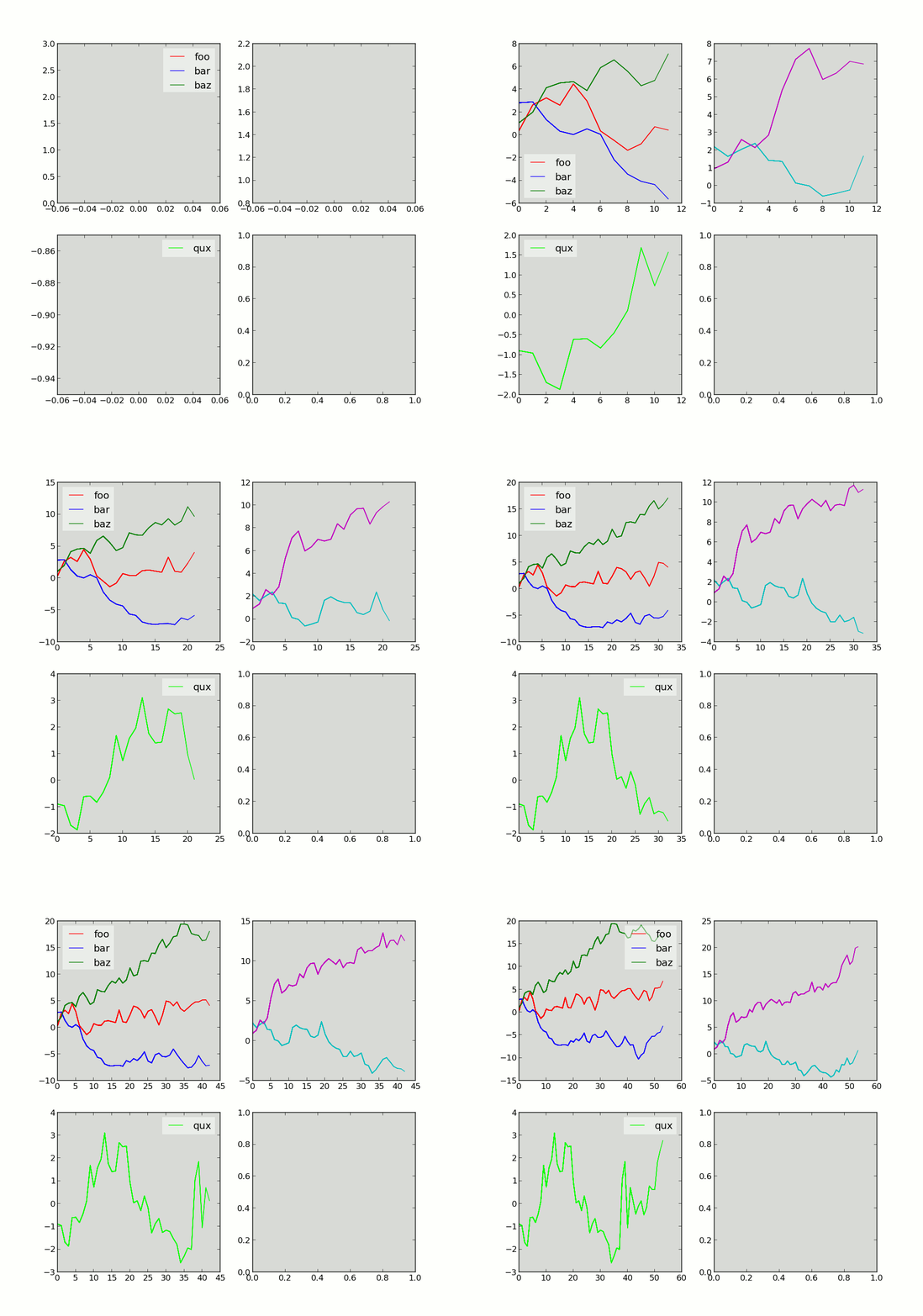
Why would anyone want such a thing? Well initially it was because I was playing around with new languages (scala and later julia) and didn't feel like spending the time learning a different plotting library initially. Since I'm quite familiar with matplotlib, it seemed natural to offload the work there. Later I realized it was actually a rather sane separation of duties. Plotting status information could happen in real-time, without sprinkling plotting code all throughout my scripts.

The above image was generated using the following script

# file rwalk.py
from numpy.random import randint, randn
mat = [[0.0] * randint(2, 6) for i in range(6)]
while True:
    mat = [[x + randn() for x in row] for row in mat]
    print ';'.join(','.join(str(x) for x in row) for row in mat)
and then piping the output to streamingplot

$ python rwalk.py | streamingplot


Usage

Most of the code I write is numerical and outputs pretty much the same two things to the terminal, either status messages (loaded data, doing this thing), or some metric to let me know what's going on (log likelihood, accuracy, parameter norms, etc). I decided to make the input format follow this idea as closely as possible. All input to streamingplot is newline delimited into two types, either status messages or plot input. Status messages are echoed back to stdout and can have any form. Plot input begins with PLOT_MARKER (defaults to >>), and is delimited by commas and semicolons. Commas delimit data sources to be added to the same subplot, and semicolons delimit data for different subplots. Here's an example

>> 1, 2, 3; 4, 5; 6, 7, 8, 9;
>> 0.5, 1.5, 2.5; 3.5, 4.5; 5.5, 6.5, 7.5, 8.5;
some status message
>> 0, 1, 2; 3, 4; 5, 6, 7, 8; 
another status message
This input defines a plot with three subplots, the first has three data sources, the second two, and the third four. None of this information needs to be provided to streamingplot, it simply assumes the first line that begins with PLOT_MARKER defines the input format. You can change PLOT_MARKER using the -p flag. I've added a pretty significant amount of options for defining labels, colors, etc. For example, if you include a file name at the end of the call to streamplot, the final image will be saved to that name

$ someprogram | streamingplot img.png
I won't outline all of the options here, the README on github contains a fairly thorough explanation. Here's some example output created using the randomstream.py script in the github repo.


Use Case

sar is a linux tool use to "Collect, report, or save system activity information." It's available as part of the sysstat package. sar has a lot of options, but by default prints CPU statistics. Typical output looks like:

$ sar 1
Linux 3.5.0-21-generic (glitchbox)  04/27/2014  _x86_64_ (4 CPU)

07:22:36 PM  CPU  %user  %nice  %system  %iowait  %steal  %idle
07:22:37 PM  all   2.53   0.00   0.76     0.00     0.00    96.72
07:22:38 PM  all   5.25   0.00   2.00     0.00     0.00    92.75
We can grab some pieces of the output using awk and then pass them along to streamingplot for visualization.

$ sar 1 | unbuffer -p awk '{ if ($3 == "all") {print ">> " $4 ", " $6 ", " $7}}' | streamingplot -l "user, system, iowait" -c 'magenta, lime, blue'
I only recently started using awk, but it is awesome for doing stuff like this. Anyway, the result looks like


Weirdness and rough edges

Streamingplot started as a quick one off script and only later did I add enough to make it resemble a useful piece of software. It works for everything I've wanted to do with it, but there are certainly some rough edges. I may try to fix these at some point.
  • If a plot line doesn't follow the format (number of subplots, etc) inferred from the first plot line, streamingplot will just take as much of the data as it can without issuing a warning. This might be bad.
  • Streamingplot redraws the entire plot every time. With lots of data this can be slow. I've tried to use the matplotib animation tools, but haven't figured out a way to make it work like I want.
  • I wanted to keep the arrangement of subplots as square as possible. This results in some wasted space occasionally. For example a plot with 7 subplots will yield a 3x3 grid with two empty subplots, rather than a 4x2 grid with one empty subplot.
  • Streamingplot doesn't expose many of matplotlibs options. No changing linestyles, labeling axes, etc.

Tuesday, April 1, 2014

Math test

$$ H_\epsilon = \{\langle M \rangle \mid M \text{ halts on } \epsilon\} $$

Tuesday, January 4, 2011

twitter streaming api with python urlib2

I previously posted this code for retrieving tweets from the twitter streaming api. It used the tweepy library and worked as a quick solution, but unfortunately occasional hiccups would cause the program to crash. Having to always tend to the program to make sure it was still running, restarting it when needed, etc got to be a real hastle so I decided to rewrite the code using python and urllib2.

imports and vars

First, a few dependencies. foreignwords is a simple module that contains a list of approximately 200 of the most frequent Spanish and Indonesian words that will be used to filter out non-English posts (this is a requirement of mine) and is available here.

import signal, socket, base64, sys, json, time, threading, urllib2, Queue
import foreignwords

SLEEP_TIME_INIT = 0.2
SLEEP_TIME_THROTTLE = 4.0
TIMEOUT_DURATION = 6.0
MAX_SLEEP_TIME = 240.0
WAIT_TIME = 4.0

USR = ''
PWD = ''

support functions

Next a few support functions. Occasionally the read will hang indefinitely. Since urllib2 abstracts away the actual socket I've used threads to create reads which timeout. Another possibility here would be to use signals. I also read you can modify the default socket timeout length, but this seemed like the best option. The other two functions are for stripping control characters and attempting to verify a tweet is English.

def timeout(func, args = [], duration = 2.0):
    class TimeoutThread(threading.Thread):
        def __init__(self):
            threading.Thread.__init__(self)
            self.result = None
        def run(self):
            try:
                self.result = func(*args)
            except:
                self.result = None
    tothread = TimeoutThread()
    tothread.start()
    tothread.join(duration)
    if tothread.isAlive():
        return None
    else:
        return tothread.result

def cleanse(text):
    return text.replace('\n', ' ').replace('\r', ' ')

def probably_english(text):
    text = text.lower()
    for c in text:
        o = ord(c)
        if o < ord(' ') or o > ord('~'):
            return False
    for word in foreignwords.words:
        if word in text:
            return False
    return True

producer

I've used a producer consumer model for retrieving and handling the tweets. The producer makes a httprequest and then reads tweets and puts them into a queue. If an error occurs while making the connection the thread will sleep for an amount of time, which increases on subsequent errors, and then try and open a new connection.

def producer(request, q, run_flag):
    time_to_sleep = SLEEP_TIME_INIT
    count = 0
    while len(run_flag) == 0:
        try:
            print 'PRODUCER > making request'
            f = urllib2.urlopen(request)
            print 'PRODUCER > request done, reading from socket'
            line = timeout(f.readline, duration = TIMEOUT_DURATION)
            while line:
                if len(run_flag) == 0:
                    q.put(line)
                    line = timeout(f.readline, duration = TIMEOUT_DURATION)
                else:
                    line = None
                    f.close()
                    return
            time_to_sleep = SLEEP_TIME_INIT
        except (urllib2.URLError, urllib2.HTTPError), e:
            print >> sys.stderr, 'PRODUCER > Exception: %s, retry in %f' %(e, time_to_sleep)
            time.sleep(time_to_sleep)
            time_to_sleep *= SLEEP_TIME_THROTTLE
            if time_to_sleep > MAX_SLEEP_TIME:
                time_to_sleep = MAX_SLEEP_TIME
        except Exception as err:
            print >> sys.stderr, 'PRODUCER > Exception: %s' %(err)

consumer

The consumer reads tweets from the queue and uses the json library to get the actual text. The tweet is then processed and written to a file.

def consumer(q, fout, run_flag):
    buff = ''
    print 'CONSUMER > starting'
    while len(run_flag) == 0:
        try:
            if not q.empty():
                while not q.empty():
                    item = q.get()
                    buff += item
                    if item.endswith('\r\n') and item.strip():
                        json_result = json.loads(buff)
                        buff = ''
                        try:
                            lang = json_result['user']['lang']
                            text = json_result['text']
                            if lang == 'en':                    # only english (not sufficient)
                                if not text.startswith('RT'):   # no retweets
                                    text = cleanse(text)        # strip '\n' & '\r'
                                    if probably_english(text):  # foreign words and ascii val
                                        try:
                                            print >> fout, text
                                        except UnicodeEncodeError as err:
                                            print >> sys.stderr, 'CONSUMER > Exception: %s' %(err)
                        except KeyError as err:
                            pass
        except Exception as err:
            print >> sys.stderr, 'Consumer > Exception: %s' %(err)
        time.sleep(WAIT_TIME)

main

Main does all the initialization of the urllib2 request and starts the threads. It then waits for a SIGINT (control c) and shuts down the threads.

def main():
    q = Queue.Queue()
    run_flag = []
    #log = open('fetch.log', 'w')
    #sys.stderr = log
    #sys.stdout = log
    fout = open('tweets.txt', 'w')
    print 'MAIN > starting'
    auth = base64.encodestring('%s:%s' %(USR, PWD))[:-1]
    authheader = 'Basic %s' %(auth)
    twitter_req = urllib2.Request('http://stream.twitter.com/1/statuses/sample.json')
    twitter_req.add_header('Authorization', authheader)
    consumer_thread = threading.Thread(target = consumer, args = (q, fout, run_flag))
    try:
        consumer_thread.start()
        producer(twitter_req, q, run_flag)
        # should never get here
        run_flag.append(False)
        consumer_thread.join()
    except KeyboardInterrupt:
        run_flag.append(False)
        consumer_thread.join()
        fout.close()
        log.close()
        sys.exit()

if __name__ == '__main__':
    USR = sys.argv[1] #username
    PWD = sys.argv[2] #password
    main()

usage

Full code is available here and can be run using
$python filename.py <username> <password>
or if running in the background uncomment the redirection of stdout and stderr in the main function and start with nohup
$nohup python filename.py <username> <password> &

Friday, November 26, 2010

clojure: the -> & ->> macros

The -> and ->> macros are pretty useful, although I haven't used them much until now. Mostly because I wasn't 100% sure of their usage. It turns out I'd normally use comp where I could be using -> and ->>. Anyway, I sat down with the repl and developed some examples that highlight the functionality of both and difference between the two.
;; same as (/ (Math/pow 1 2) 2) = (1^2)/2
user=> (-> 1 (Math/pow 2) (/ 2))
0.5
Now changing -> to ->> a very different result is obtained
;; same as (/ 2 (Math/pow 2 1)) = 2/(2^1)
user=> (->> 1 (Math/pow 2) (/ 2))
1.0
As can be seen, the difference between the two macros is how the items are inserted in the forms, as the second item when using -> and as the last item when using ->>. In either case it benefits from readability when compared to something like:
user=>((comp #(/ % 2) #(Math/pow % 2)) 1)
0.5

Thursday, October 21, 2010

sorting clojure maps by value

So, here's the setup. I needed to sort a clojure map by the value stored in the map, not by key as is the case for sorted map (the values aren't unique, so a sorted-map won't work). Basically I have a whole bunch of text and I want to keep a count of the number of occurrences for each word. I'll probably post the tokenization code a little later, but if anyone is interested it lives here. So we have a big soup of unique keys and some value associated with the key. Awesome. Let's sort it.
(into (sorted-map-by 
  (fn [key1 key2] (compare (super-map key2) (super-map key1)))) 
super-map)
*btw, the above code can be found verbatim here.

So that works, right? Sure, unless of course duplicate values reside in the map, in which case you'll be short some entries. So here's my seat of the pants solution, slightly tested as it is.
(defn omg-sort
  "create a map sorted in descending order, first by value, then by key"
  [super-map]
  (into (sorted-map-by 
    (fn [key1 key2] 
      (let [val1 (super-map key1) val2 (super-map key2)] 
        (cond 
          (= val1 val2) (.compareTo key2 key1) 
          (< val1 val2) 1 
          :else -1)))) 
  super-map)
)

This works by sorting by value, and then by key if the values are the same. As always, I welcome any suggestions, refinements, improvements.

Thursday, September 23, 2010

tweepy, twitter streaming samples

I've been playing around with a python library, tweepy, for accessing the twitter api. I'll be using the streaming twitter data for the sentiment analysis project I'm working on. A very basic sample piece of code that gets 10 posts and then prints them can be found here.